Best Baby Monitors 2026: 4 We'd Actually Buy

A dad of two who's been through the stroller-buying gauntlet twice. I don't pretend to have tested every stroller — I research what parents actually report after months of real use, then tell you what holds up and what quietly disappoints.
Just so you know, some links on this page are affiliate links. If you buy something via them, we get a small kickback. You don't pay more, but it helps toward our research.
There is a specific kind of relief the first night you can watch your baby breathing on a screen instead of tiptoeing to the crib every twenty minutes to check. The best monitor for most families is the eufy E21: it does everything the modern app-connected cameras do, then hands you the one thing most of them won't, footage stored on your own SD card with no monthly fee and a switch that takes the camera off Wi-Fi entirely. Here are the monitors worth buying in 2026, who each one suits, and the traps to sidestep on the way. If you're still piecing together the wider kit, our honest guide to what a baby actually needs keeps the list short, and our best smart bassinets guide covers the sleep-space side of the nursery.
Quick Picks
More comparisons below — or jump to related guides.
Those three answer most buyers. Below you'll find a genuinely cheap fourth option, a fuller case for each, and an honest word on the wearable "vitals" monitors everyone asks about.
Why these picks
A baby monitor gets used harder than almost anything else you buy, every night for a year or more, so reliability and peace of mind matter more than spec-sheet bragging rights. We weighed the manufacturer specifications against the patterns that show up again and again across parent communities like r/beyondthebump and r/newparents, and against independent testing from the likes of BabyGearLab, Wirecutter and Consumer Reports. Every monitor here is sold on Amazon US, and we have left off anything we couldn't recommend to a friend with a straight face. One theme runs through all of it: the biggest decision you will make is not resolution or screen size, it is whether the camera talks to the internet at all. Get that call right and everything else is detail.
The best for most people: eufy E21
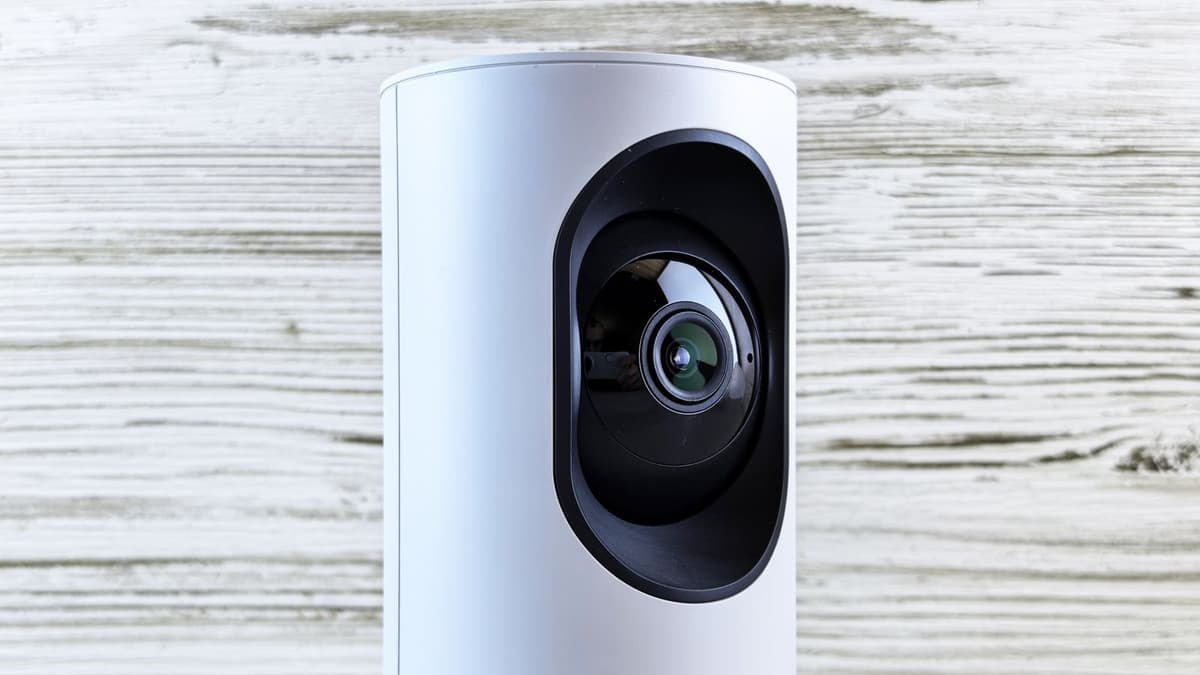
The eufy E21 is the monitor we would point most new parents to, because it refuses to make you choose between modern convenience and privacy. It gives you a sharp 4K camera with a proper motorised pan, tilt and 8x zoom, a 5-inch parent screen, and a companion app for when you want to peek from the office or hand a view to a grandparent. Then it does the thing the subscription-hungry brands won't: it records around the clock to a microSD card in the camera, stored locally and encrypted, with no monthly fee standing between you and your own footage.
What wins people over is the physical Wi-Fi switch. Flip it off and the camera stops talking to your router altogether, communicating only with the dedicated parent unit, which is about as close to hack-proof as an app-capable camera gets. Flip it on when you actually want remote viewing. You are not locked into one philosophy for the life of the product, which is rare in this category and genuinely reassuring.
Who it's for: almost everyone. Parents who want the app, the pan and tilt, and the option of checking in from outside the house, but who bristle at the thought of paying a subscription or trusting a cloud with the nursery. The honest limitations are minor. The microSD card is not included, so factor one into the budget. Four thousand pixels of resolution is more than you will ever really register on a 5-inch screen. And the app, while thoroughly solid, is not quite as glossy as Nanit's. None of that moves the recommendation. For the overwhelming majority of families, this is the one. If you are weighing it specifically against the no-Wi-Fi route, our eufy E21 vs Infant Optics DXR-8 PRO comparison goes deep on that exact decision, and our full eufy E21 review covers the camera in depth.
The privacy pick, no Wi-Fi at all: Infant Optics DXR-8 PRO
If the very idea of a nursery camera sitting on your home network makes you uneasy, the Infant Optics DXR-8 PRO is the answer, and it has been the quiet favourite of security-minded parents for years. There is no app, no account and no internet. The camera and the 5-inch parent unit talk only to each other over a closed frequency-hopping signal that resists interference and eavesdropping, and nothing your baby does ever leaves the house.
What lifts it above the usual non-Wi-Fi crowd is the interchangeable lens system. It ships with a standard zoom lens and takes an optional wide-angle lens, so you can frame a tight crib shot or take in a whole room without smearing the image. The Pro model adds active noise reduction that strips the white-noise hiss out of the audio, so you hear the baby and not the room, and the parent unit runs a user-replaceable battery, which quietly matters on a device you will run every single night for a couple of years.
Who it's for: parents who value privacy and dead-simple reliability over remote features, and anyone who has read one too many stories about strangers talking to babies through hacked Wi-Fi cameras. The trade-offs are simply the flip side of its strengths. You cannot check in from your phone, there is no recording or history to scroll back through, and the video is a clear 720p rather than the eufy's 4K. If you know you will never want to watch the baby from the far side of town, not one of those things will trouble you. Our full Infant Optics DXR-8 PRO review digs into the lens system, the noise reduction, and how it holds up as a second camera.
Get the Infant Optics DXR-8 PRO on Amazon →
The overhead view and sleep tracking: Nanit Pro
The Nanit Pro takes a different view of the crib, literally. It mounts overhead on a stand or wall for a clean bird's-eye shot, and that angle is what makes its signature trick possible: it reads your baby's breathing motion from the pattern printed on a specially designed swaddle or band the baby wears, and that band carries no sensors, wires or electronics against the skin. For an anxious first-time parent at 2am, that overhead breathing display can genuinely be the difference between lying awake and drifting back off.
Crucially, and contrary to a lot of forum grumbling, the Nanit works as a complete monitor with no subscription at all. Live 1080p video, two-way audio, sound and motion alerts, temperature and humidity readings, background audio and a nightlight are all included out of the box for up to two caregivers. The paid Insights plan only layers on the deeper sleep analytics, the breathing-history tracking and saved video. You can run the camera indefinitely without paying another penny and simply go without the long-term sleep charts, which is worth knowing before the online complaints put you off.
Who it's for: parents who specifically want the overhead angle and the reassurance of breathing tracking, and who appreciate a genuinely best-in-class app. The honest case against it is the price, which sits firmly at the premium end of this list, and the fact that the features people most associate with the Nanit name, the sleep science, live behind that annual plan. It also leans on a strong, stable home Wi-Fi connection in a way the local-first options here simply don't. Our full Nanit Pro review covers the breathing band, the subscription question, and who should skip the premium.
The budget pick that still does the job: VTech (No Wi-Fi)
Not everyone needs 4K or breathing science. If you just want a dependable video monitor that shows you the baby, lets you talk back, and does not cost as much as the crib it sits beside, VTech's no-Wi-Fi range is where sensible budgets land. You get a colour screen, solid night vision, two-way talk, a genuinely long parent-unit battery, and a closed connection that, like the Infant Optics, never once touches the internet.
Who it's for: budget-conscious first-time parents, anyone buying a second unit to leave at the grandparents', or families who simply want to see and hear the baby without adding another app to their phone. It is basic by design, and honest about it. The screen is smaller, the extras are few, and there is no remote viewing on offer. But for a first baby on a tight budget, or as a no-fuss backup to a fancier camera, it does the actual job of a baby monitor and punches well above its modest price. Our full VTech VM819 review covers the battery, the screen, and when it is worth spending a little more.
Get the VTech monitor on Amazon →
How the four compare
| Monitor | Connection | Video | Local recording | Subscription | Best for |
|---|---|---|---|---|---|
| eufy E21 | Hybrid, with a Wi-Fi off switch | 4K, motorised pan-tilt | Yes, to microSD | None | Most families |
| Infant Optics DXR-8 PRO | No Wi-Fi, closed FHSS signal | 720p, swappable lenses | No | None | Total privacy |
| Nanit Pro | Wi-Fi | 1080p overhead view | Via the paid plan | Optional, extras only | Breathing and sleep tracking |
| VTech (No Wi-Fi) | No Wi-Fi, closed signal | Colour screen, night vision | No | None | Tight budgets and second units |
What to Avoid
The single worst buy in this whole category is a cheap, unbranded Wi-Fi camera from a marketplace no-name. These are the cameras that end up in the "hacked baby monitor" headlines, and it is rarely just bad luck. They ship with weak default passwords, stop receiving security updates almost immediately if they ever received any at all, and pipe your nursery's video through servers you know nothing about in places you cannot see. Saving twenty dollars is not worth handing a stranger a window into your child's room. If you want Wi-Fi, buy a named brand with a real security track record and a reason to protect its reputation, like the eufy or the Nanit above.
Be just as clear-eyed about the wearable "vitals" monitors, the socks and bands that promise to track your baby's oxygen and heart rate, most famously the Owlet. They are not medical devices, they are not cleared to detect or prevent SIDS, and the evidence is consistent that they generate false alarms that spike parental anxiety without any proven improvement in safety. If a wearable genuinely helps you cope, that is a personal call and a fair one, but buy it understanding exactly what it is and is not, keep it as a comfort rather than a guardian, and never let it stand in for safe-sleep basics or the advice of your doctor.
Finally, don't overpay for numbers you will never actually see. A 4K sensor is a pleasant bonus on the eufy, but "more megapixels" splashed across a 5-inch parent screen viewed from across a dark hallway is marketing, not benefit. Put your money into the things that genuinely matter, which is exactly what the next section is for.
What actually matters when you choose
Get the one big decision right and the rest falls into place. That decision is Wi-Fi or no Wi-Fi. A non-Wi-Fi monitor like the Infant Optics or the VTech keeps everything sealed inside your home, which is the most private and the most tamper-resistant setup there is, at the single cost of never letting you check in from somewhere else. A Wi-Fi monitor like the Nanit, or a hybrid like the eufy, adds the phone app and remote viewing, and in exchange puts the security burden on you to choose a reputable brand and set a strong password. There is no universally correct answer here, only the one that matches how you honestly feel about a camera on your network. Decide that first and the shortlist shrinks itself.
After that, watch the subscription question closely, because it is where the real long-term cost likes to hide. Some brands quietly lock basic functions, or all of your video history, behind a monthly plan, so a cheap-looking camera turns into an expensive commitment across a year of ownership. The monitors we recommend either charge nothing at all (the eufy, Infant Optics and VTech) or work fully without a plan and reserve the subscription for genuine extras (the Nanit). Read that fine print before you buy rather than after the first bill lands.
Beyond those two, prioritise a small handful of practical things and ignore the rest. Local storage on an SD card beats cloud-only if you care about privacy or want to sidestep fees entirely. A real motorised pan and tilt lets a single camera follow a rolling, cruising, escaping toddler where a fixed lens simply cannot. Honest battery life on the parent unit matters more than the headline figure, because bright screens drain fast in the real world. Good night vision is not optional, since you will use this thing in the dark far more than in daylight. A temperature and humidity readout is a genuinely useful small touch for keeping the room in the safe range. Two-way audio that lets you soothe from the sofa before committing to the stairs earns its keep more often than you would expect, and if a second child or a second room is on the horizon, a monitor that pairs more than one camera to a single parent unit spares you buying the whole thing twice. Almost everything else on the box is a nice-to-have you will forget about within a week.
Which one fits your situation
If you are a first-time parent who wants the reassurance of seeing the baby from your phone but hates the idea of a subscription, the eufy is the natural home, and it is where most people should land. If you have read the hacked-camera stories and simply do not want a nursery camera on your network at all, buy the Infant Optics and never think about it again, though our eufy vs Infant Optics head-to-head weighs the two side by side first. If your worry runs specifically to breathing and sleep, and you want the overhead angle with the science to match, the Nanit is built for exactly that anxiety, provided your Wi-Fi is up to it. And if money is tight, or you are kitting out a second room or the grandparents' house, the VTech does the core job without fuss. Having two under two, or a big house with thick walls? Look for a system that supports a second camera on one parent unit, which both the eufy and the Infant Optics handle, so you are not juggling two screens in the small hours. Match the monitor to how you actually live and worry, not to the longest spec sheet, and you will still be glad of it at 3am, which is the only test that really counts.
What we'd buy today
For most families, the eufy E21 is the monitor to get. It gives you the modern features, the pan and tilt, and the app when you want it, then respects your privacy and your wallet with local recording, no subscription, and a Wi-Fi switch you control with your own thumb. If your priority is absolute privacy with no internet anywhere in the equation, the Infant Optics DXR-8 PRO is the one to trust. And if the budget is genuinely tight, the VTech no-Wi-Fi monitor will see and hear your baby perfectly well for a fraction of the price. Whichever way you go, get it out of the box and set up before the baby arrives, because the first night you actually need it is not the night to be learning the menus.
As an Amazon Associate, we earn from qualifying purchases.
Products Mentioned in This Guide
Still comparing options?
Browse all our brand-vs-brand pushchair guides to find the right fit.
Browse All GuidesFrequently Asked Questions
What is the best baby monitor in 2026?
For most families the eufy E21 is the best baby monitor: it pairs a 4K pan-tilt camera and an app with 24/7 local recording and no subscription, plus a Wi-Fi switch for privacy. If you want no internet at all, the Infant Optics DXR-8 PRO is the pick; for the overhead view and breathing tracking, it is the Nanit Pro.
Do I need a Wi-Fi baby monitor?
No. A non-Wi-Fi monitor like the Infant Optics or a VTech keeps everything inside your home, which is the most private and tamper-resistant option, but you cannot check in from your phone. A Wi-Fi or hybrid monitor adds remote viewing at the cost of putting the security on you to pick a reputable brand and a strong password. Neither is universally right.
Are baby monitors safe from hackers?
A non-Wi-Fi monitor cannot be hacked over the internet because it never connects to it. If you want Wi-Fi, buy a named brand with a real security record and set a strong, unique password. The genuine risk is cheap unbranded Wi-Fi cameras, which ship with weak default passwords and little or no security support.
Do baby monitors need a monthly subscription?
The monitors we recommend do not. The eufy, Infant Optics and VTech charge nothing, and the Nanit works fully as a monitor without a plan, reserving its subscription for sleep analytics and saved video. Some other brands lock basic features or all video history behind a monthly fee, so check before you buy.
Can a baby monitor track breathing?
The Nanit Pro tracks breathing motion with an overhead camera that watches a specially patterned band the baby wears, and that band contains no sensors, wires or electronics. Wearable socks and bands that claim to track oxygen and heart rate, such as the Owlet, are not medical devices and are not cleared to prevent SIDS, so treat them as comfort rather than a guardian and never let them replace safe-sleep basics.